
Apply 2D textures to any 3D animated model — no UV unwrapping, it's animation ready, works with deformations.
for Blender 5.0+ · polyplanar-v0.11.11.zip
Apply 2D textures to any 3D animated model — no UV unwrapping, it's animation ready, works with deformations.
for Blender 5.0+ · polyplanar-v0.11.11.zipDefault Triplanar is exciting at first, but...
when you first use it (aka Box Projection), it seems like the perfect
solution for texturing models
without UV unwrapping as you can even blend the projection planes to
hide seams. However, when you check support of deformations, it fails
miserably. Don't even think of trying to rotate a projection plane or expect a correct shading
from normal maps - the excitement does not last long.
But now, PolyPlanar solves this by projecting textures that follow the geometry,
giving you the individual control you need.
And on top of that enhancing blending capabilities, adding auto proportions,
randomization, scattering, unleashing non-destructive workflow and
automation of the boring bits.
Select your targeted nodes and right click to project them. Or Shift + A > PolyPlanar > Evaluate Selected as...
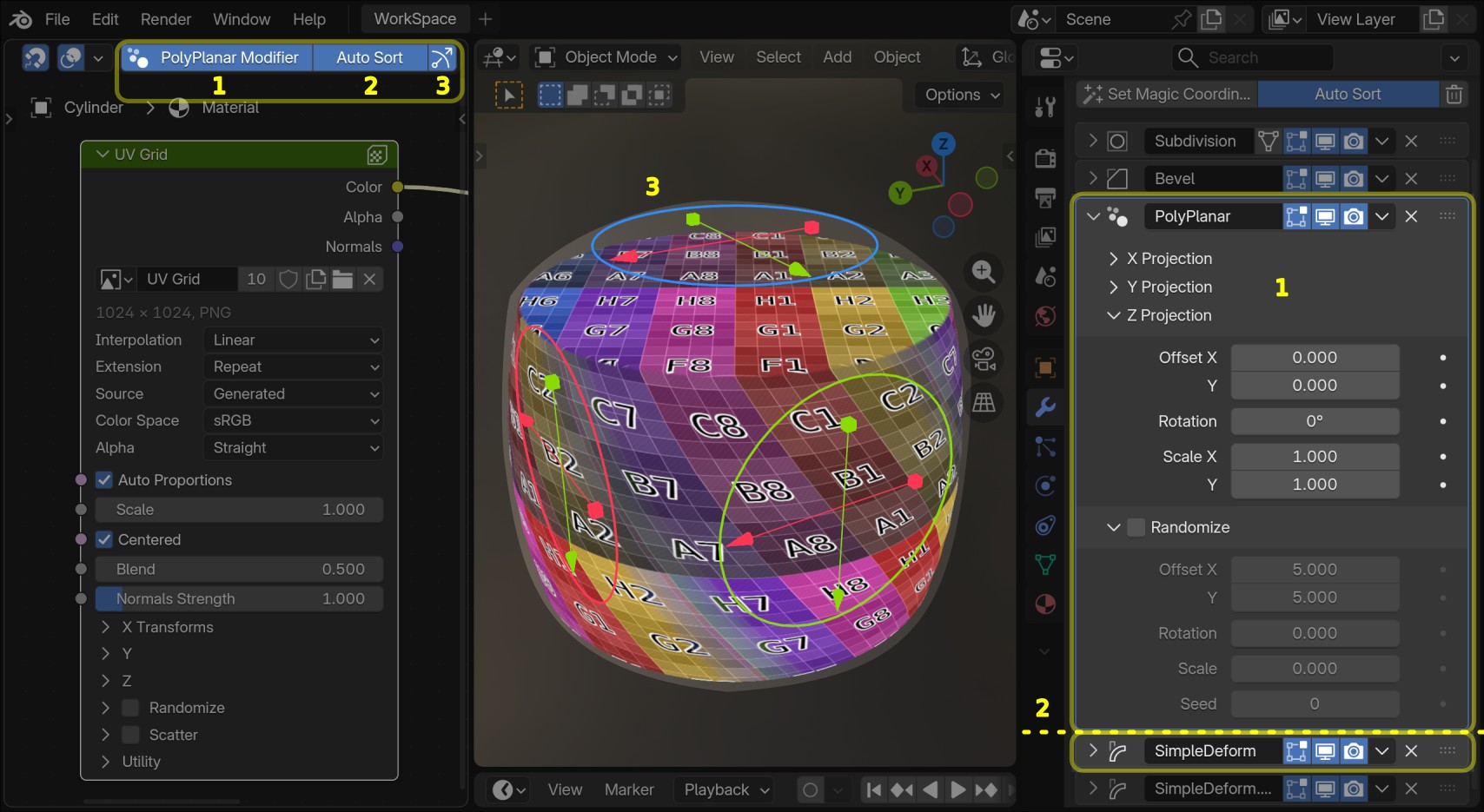
Tweak projections globally per PolyPlanar Node or locally per object, by toggling the PolyPlanar Modifier which provides Gizmos right on the viewport.
One material, infinite looks - Randomize texture transformations per object, instance and/or mesh-island.
Scatter textures across surfaces - offset, rotate, enlarge randomly and blend tiled or non-tiled textures.
Blend projection planes and scatter cells smoothly and watch seams disappear. Artifact-free textures across your entire model.
Even after blending you can displace your materials safely. No random spikes popping-up because other cheap dithering tricks.
Deform it out of the batch — Jump ahead to the action and avoid marking seams, unwrapping... and all that tediousness 🥱
With PolyPlanar Modifier you can work with procedurally generated geometry — bevels, subdivisions, arrays, geonodes — to maximize your workflow potential.
Blender's default Triplanar does not handle normal map shading — PolyPlanar brings corrected local space normal transformations.
Disclaimer: geometry deformations and parent transformations are not solved for normal maps yet. Learn more why.
Common questions about PolyPlanar. Click any question to expand the answer.
No. As it uses only built-in features and local data the file will just work if you send it to a colleague or render farm that does not have the add-on installed. Only usability features won't be available like quick operators, automatic base attributes management and PolyPlanar Modifier batch placement and automatic modifier sorting.
Yes, with one note: Shape Key deformations are possible when the PolyPlanar Modifier is not active on the object. When using the modifier for parametric workflows, the base attributes end-up being overwritten by the modifier at the object's modifier stack level while shape-keys need these attributes at the geometry level.
Yes. The PolyPlanar Modifier is designed to slot into a non-destructive, procedural stack. Bevels, arrays, subdivisions, and Geometry Nodes all work alongside it, letting you iterate on your mesh shape without ever re-unwrapping.
Yes. PolyPlanar is built specifically around deformation support. Textures follow your geometry as it squashes, stretches, or bends — no UV unwrapping required. Shape Key deformations are also supported when the PolyPlanar Modifier is not in use.
To certain extent yes. PolyPlanar applies corrected local-space normal transformations so that normal maps shade correctly when object is rotated, scaled and transformed. Note that geometry deformations and parent transformations are not yet solved for normal maps; see the documentation for details.
The PolyPlanar node lives in the Shader Editor and leads the triplanar projection logic — scatter, randomization, blending, and per-axis transforms.
The PolyPlanar Modifier is a Geometry Nodes modifier that lets you control projection parameters per object directly from the Modifiers tab and randomization per instance and mesh island, complete with viewport gizmos, and enables procedural/parametric workflows.
Yes. PolyPlanar is fully compatible with both Cycles and EEVEE render engines in Blender 5.0 and later.
PolyPlanar requires Blender 5.0 or later. Older versions are not supported. Installation is a simple drag-and-drop — no manual folder copying needed or external libraries.
| Feature | PolyPlanar Add-on | Blender's Triplanar |
|---|---|---|
| Deformation support | ✔ | ✘ |
| Shape Keys support1 | ✔ | ✘ |
| Parametric workflow (PolyPlanar Modifier) | ✔ | ✘ |
| Built-in scatter | ✔ | ✘ |
| Built-in randomization per object, instance and/or mesh island | ✔ | ✘ |
| Corrected normal maps2 | ✔ | ✘ |
| Viewport gizmos | ✔ | ✘ |
| Per-axis projection transforms | ✔ | ✘ |
| Auto proportions | ✔ | ✘ |
| Procedural 2D texture mapping without UVs | ✔ | ✘ |
1 Shape Keys deformations are possible when not using the PolyPlanar Modifier.
2 Corrected normal maps only apply to local object transformations.
PolyPlanar — The main node for controlling image-based triplanar mapping with scatter,
randomize, blending and per-axis transforms
PP Evaluate Image — Node that receives the controllers and image to be evaluated. It comes with
quick operator for automatic setup
PP Evaluate Shader — Node that receives the controllers and shader to be evaluated. It comes
with quick operator for automatic setup
PolyPlanar Modifier — geometry nodes modifier with dedicated panel for batch
placement, stack auto-sorting and viewport gizmos enabling procedural and parametric workflows. Per object,
instance and/or mesh island randomization and projection mapping override
Automatic attribute management — Base mesh attributes are tracked and updated silently
Full documentation — Comprehensive user guide with visual examples and troubleshooting
Blender 5.0 and later · Windows, macOS, Linux
Drag-and-drop installation · Works with Cycles and EEVEE